


Your words. Your ink.
Explore tattoo lettering, make it your own, and save a design to share with your artist.
Long text scales down to fit. Downloads are 1800 × 990 pixels. Your text stays in your browser.
Tap ♡ to save favorites. Copy gives you plain text; PNG downloads preserve the lettering.
Before you make it permanent
Use these designs as references for your tattoo artist. Ask your artist to check spacing, detail, and readability at your intended tattoo size. Mirrored previews are not professionally prepared stencils.
Fonts load from Google Fonts and require an internet connection. Unsupported characters may use a fallback font. Check spelling, translations, and symbols carefully. Favorites are stored on this device when browser storage is available.
A generator makes tattoo font styles easier to test before committing ink to real skin. Enter a sample word, compare letterforms, and consider the style feel alongside context, meaning, and taste before choosing your design.
The strongest design is not always the most ornate: readable text, suitable spacing, and balanced proportions often matter more than decoration. Compare several options, then discuss the lettering carefully with your tattoo artist before committing.
Table of Contents
Tattoo Font Generator / Choosing Your Style
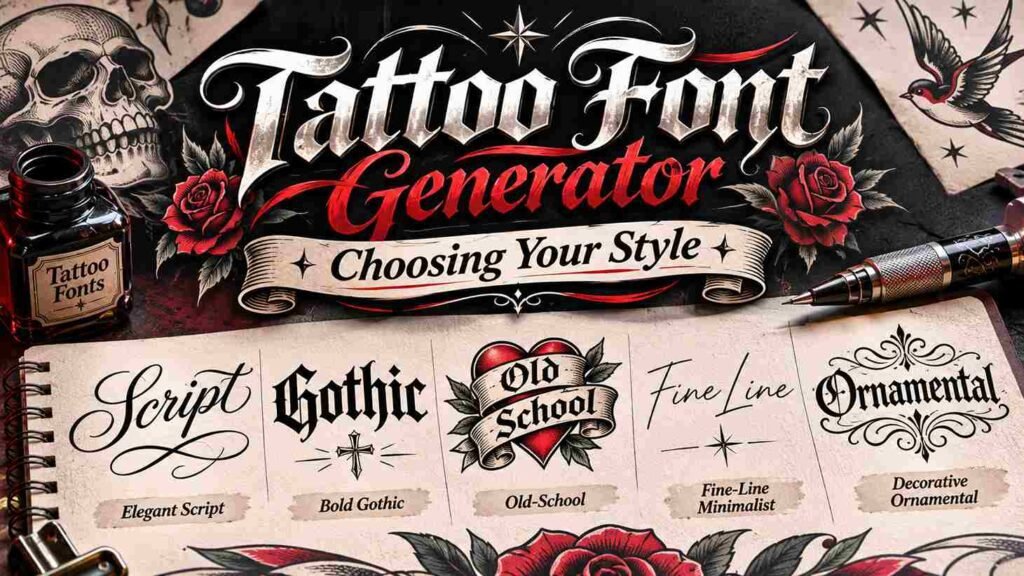
Choosing a tattoo style should begin with its setting, not its trend: traditional tattoo script may suit chest pieces, while flowing lettering can soften a name; test scale before settling on permanent ink on skin.
Compare classic scripts with edgy modern typography and elegant scripts on the actual body area. For a sleeve, connected letterforms may need breathing room; sharper angular designs can feel bolder at smaller sizes after healing.
Body Placement / Skin Preview
Use Try on to preview lettering on a photo of skin, carefully checking placement across arm, leg, back, chest, or wrist before an appointment. Compare real-world size and scale so lettering suits each body area.
Initials, dates, and short quotes may look balanced on the forearm or hands, while bold lettering needs breathing room. Compare tattoo previews for device compatibility, then ask the tattoo artist to carefully refine the stencil.
Readable Text / Line Weight And Longevity
Readability on skin depends on line weight as much as style: thin lines may soften or merge after healing, so test the design at its intended size before committing with your artist in natural light.
For longevity, avoid crowding letters and ask for a stencil at real-world size; spacing that looks elegant on a screen can close together on skin, especially across curved placement as ink naturally settles during healing.
Exporting / Stencil / Taking It To Your Artist
Before the appointment, download your design and prepare a print-ready tattoo stencil as a clear reference for your artist. A PNG supports quick sharing, while an SVG supports resizing if vector editing software is available.
Keep the original plain text beside the image, note the size, and add a screenshot showing your preferred style direction. During consultation, discuss final adjustments, line weight, and whether the stencil remains legible at scale.
How To Use The Tool
Start with a clear name or phrase, then enter text into the generator. Compare previews at a comfortable size before choosing lettering, since narrow strokes and ornate details may change how a tattoo reads onscreen.
Next, select style options that match the tattoo’s mood and placement; inspect every letter, symbol, and spacing detail. When the design feels balanced, copy result for a final review before sharing it with your artist.
Why Choose / Why Use This Generator
Choose this generator when you want to assess live previews before committing to a design. Compare lettering proportions, test a name on screen, and notice whether each style remains readable at your intended size first.
A useful final check is output quality: match the ink color picker preview to your concept, then use a print calibration sheet to confirm dimensions with your artist before any stencil is prepared for transfer.
Tattoo Text In Any Language And Symbol System
A tattoo lettering tool can preview non-English lettering across other languages, but supported shapes depend on each Script and available characters. Test Arabic, Chinese, or Cyrillic carefully before committing designs to skin with your artist.
Decorative Unicode styles may render cleanly, yet a screen preview cannot guarantee a stencil-ready result. Check non-Latin scripts, symbol spacing, readability, and the artist’s lettering reference before finalizing any tattoo in actual size with care.
Wear It First As A Temporary Tattoo
Before committing to ink, test your lettering as a temporary tattoo on realistic skin. A skin preview helps reveal how curves, spacing, and size interact with the chosen tattoo ideas and body placement in daylight.
Try the design at its intended body placement, then resize it, adjust the angle, and check readability while moving naturally. This rehearsal can expose awkward wrapping before an appointment and help you discuss changes confidently.
Social Media Presence
Your tattoo font can extend beyond skin previews into social media, where a carefully chosen style gives bios, status updates, and profile text a recognizable personality without replacing readable, meaningful wording across multiple social platforms.
Keep the lettering consistent with your custom font, then copy and paste a design into an Instagram caption or messages; a restrained treatment helps you stand out while keeping the tattoo’s meaning clear to readers.
Tattoos And Digital Art
Digital art can test a tattoo before skin is involved: an AI tattoo maker lets you compare custom designs, placement ideas, and 3D surface previews, while digital projects keep revisions organized for discussion before committing.
A high-quality output is not automatically tattoo-ready; combine accurate rendering with print-ready stencils, then inspect missing diacritics and fine details at intended size. Your artist can adapt the screen concept for real skin and placement.
Messaging And Bios
A profile can introduce a tattoo idea without turning it into a permanent statement. A digital presence built around meaningful lettering lets you test how a phrase looks on Facebook before choosing ink for yourself.
Keep profile descriptions concise: a message can explain the meaning behind a design, invite questions, or share the story that inspired it. Read it aloud, check tone, and avoid promising that lettering guarantees tattoo-ready artwork.
Unicode Isn’t A Real Tattoo Font
Unicode text can imitate a tattoo font generator result, but it is not an installed typeface. These characters rely on device fonts, so their appearance may shift across screens before an artist redraws the design.
Use Unicode character previews for quick ideas, then request ink-ready art or a mirrored stencil showing the intended lettering. For real tattoos, confirm spacing, line weight, and final contours with your tattoo artist before inking.
Why Do Some Fonts Show As Boxes?
Some boxes appear when a device cannot render certain Unicode characters; the selected typeface may lack those glyphs, so default system fonts replace elegant lettering with a blank square instead of the intended tattoo preview.
Before you share a design, test its reliable display across devices: older Android devices and some Windows configurations may handle Cursive Flourish or Gothic differently, even when the lettering looks correct in your browser preview.
Also Read: Cursive FontsWhere It Works And Where It Breaks
Unicode blocks often work well for a quick mockup tool or reference tool, especially when comparing decorative styles on social profiles. However, a screen preview cannot guarantee how ink will settle on skin after healing.
Actual durability depends on placement, line weight, and artist technique. thin strokes and dense letterforms may lose clarity at small sizes, while a cleaner style usually remains easier to read over time in many cases.
Conclusion
A reliable tattoo design begins with readable lettering, but a digital preview is only a planning aid. Check every curve, spacing choice, and line weight carefully before asking your artist to refine the final stencil.
Treat Unicode styles as inspiration, not finished artwork: confirm symbols reproduce correctly, test placement at the intended size, and let a qualified tattooist adapt the design for skin, longevity, and personal meaning before committing permanently.
Can I Use The Output For A Real Tattoo / Give It To My Artist?
Yes, use the generator’s lettering as a reference image for your artist, not as a finished stencil. Confirm final size, placement, and line weight; ask them to refine details before stencil prep with transfer paper.
Does It Support Other Languages?
A generator may display non-Latin scripts, including Chinese characters, Japanese kanji, Arabic calligraphy, or Cyrillic, but appearance depends on device support and available glyphs; always confirm the writing system with your tattoo artist before inking.
What Do The Style Options Mean / Which Is Best For Tattoo Script, Old English, Or Gothic?
Choose Cursive for flowing tattoo script, Old English for historic contrast, and Gothic blackletter for dense drama. Calligraphy feels graceful, while Block lettering prioritizes clarity; preview each style at your intended tattoo size before committing.
How Do I Use It?
Start by type your word or name in the text box, then choose your style and compare previews. Check readability at the intended size, copy the result, and share it with your tattoo artist beforehand.
Does It Work On Mobile?
Yes, the generator works on mobile devices when its page runs in browser, letting you type a name, browse styles, and check an instant preview before copying. A desktop helps compare details; installation isn’t necessary.


Pingback: Mirror Text Generator – Reverse & Flip Text Online
Pingback: 3D Text Generator – Free 3D Fonts & Text Effects
Pingback: BeReal in Different Fonts – Stylish Text Copy & Paste
Pingback: Strikethrough Text Generator – Free Copy & Paste Tool