
Bubble Letters Copy & Paste – Free Bubble Text
Bubble Font Generator
Create bubble letters and stylish circled text instantly. Type your text, choose your favorite style, and copy it anywhere.
Bubble Letters Alphabet
Click any alphabet row to copy it.
Bubble lettering becomes useful when ordinary text needs a playful accent without turning into an image. Using Unicode characters, you can type message, preview a bubble characters style, copy and paste it as plain text.
From my experience testing social profiles, the advantage is simple: works almost anywhere, while style preserved text remains editable. A single character can create Bubble Letters that suit bios, labels, captions, and quick creative posts.
Table of Contents
How Bubble Letters Copy & Paste Works
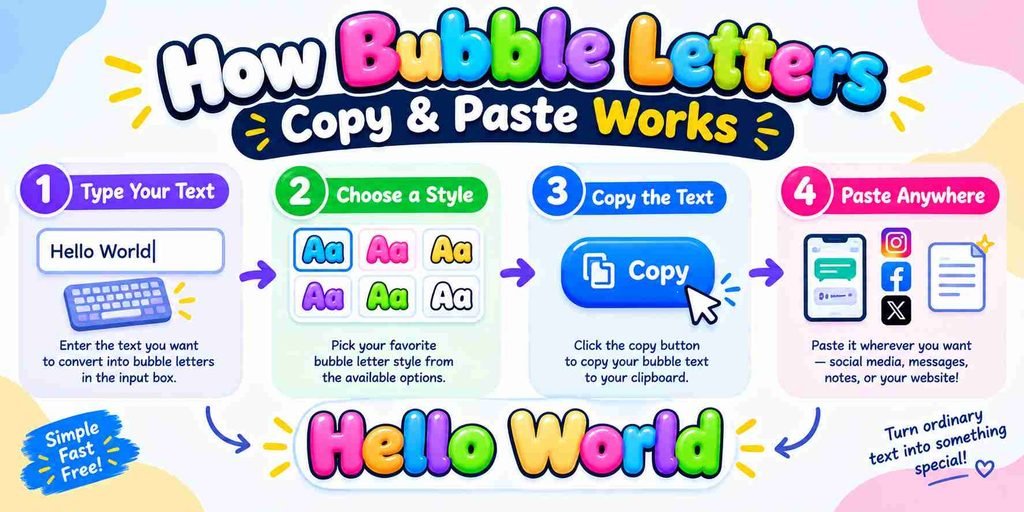
The process is simple: type your phrase, inspect multiple styles, and compare spacing before choosing. There is no keyboard layout to configure, so beginners can create copy-ready characters without changing ordinary writing habits or punctuation.
On touchscreens, I open a Circled card, filled card, or squared card, then test the single Unicode character in its destination. After selecting a click result, copy it to the clipboard, then verify output onscreen.
Bubble Styles Available
Bubble letters group by visual weight rather than one fixed font: round outlines, Black Bubble, Squared, and Square Bubble styles create distinct moods, while mixed case, uppercase-looking, and enclosed forms change overall rhythm for users.
When I compare previews, compact filled badge look works for short labels, while tile, keycap look, and strongest visual weight suit gaming. filled and outlined options let readers quickly distinguish airy versus dense bubble text.
Alphabet And Number Samples
Alphabet samples become more useful when you compare round, square, and enclosed forms beside plain digits. I usually test A to Z, then add bubble numbers, because coverage can differ sharply between individual style sets.
For checks, I paste ⓪–⑨, ①–⑳, and ❶–❿ into a field, checking circled digits and enclosed digits for consistent display. This makes numbered steps, checklists, and labels easier to design confidently on all devices reliably.
Also Read: Embroidery Fonts
Which To Choose
Choose Circled Unicode when you need round outlines and flexible mixed-case behavior for short labels. Select Black bubble Unicode when a filled badge look matters more than delicate letter shapes on profiles, names, and accents.
For stronger blocks, consider Squared Unicode or Black square Unicode; choose a Bubble font or image when precise shapes, colors, licenses, and image export matter for artwork, branded designs and print asset SVG TTF download.
Bubble Numbers / Digit Coverage
For practical sequences, Circled digits create clear markers, while dark circled digits increase contrast. I find digit coverage most useful when a sequence needs navigation or numbers that stand out without replacing plain text naturally.
Before publishing, I check the preview because enclosed numbers can fit lists, diagrams, buttons, and signs, yet digits show uneven coverage. Each character depends on its code point, and supported circled digits vary by style.
Features / Why Use This Tool
I use bubble text when a compact visual change adds personality without an app. Copy button, Unicode text, and instant generator features make social media profiles, chats, and short labels quick to refresh across platforms.
The practical advantage is flexibility: ⓢⓣⓔⓟ ①, filled circles, and square bubbles create distinct markers, while mobile devices and no app installation keep the workflow simple. I always test first because device fonts affect rendering.
Best Uses / Where To Use Bubble Text
Bubble text works well for display name ideas, playlist title styling, and a category label when ordinary typography feels flat. I often use sticker-like rhythm to make short interface text feel friendlier and memorable online.
For social profiles, Instagram bios, Discord labels, and TikTok captions, a few one bubble word elements can add character without overwhelming the message. For gaming, tag or role label uses are especially practical there too.
Names And Short Labels
Bubble lettering works best when a name needs recognition without taking much space. For a bio, short label, or caption accent, I prefer shapes that stay readable beside ordinary text across profiles, posts, and menus.
For community spaces, bubbly wording can distinguish usernames, server names, and channel descriptions without needing a separate image. I also find team abbreviation styles useful when compact identifiers need personality, especially beside an event badge.
Numbered Steps And Markers
Numbered bubble letters help organize lists, instructions, captions, and labels without demanding a separate image. I often use step 1, then step 2 style markers when plain text needs playful structure for visual reading order.
For examples, combine ①②③ with a sample table entry, or use circled A markers when Unicode survives across platforms. Keep numbering short because twice as wide characters may wrap badly on narrower screens and phones.
Bio And Caption Accents
Bio And Caption Accents turn ordinary profiles into recognizable signatures. I often use playful accents, short bios, and one-word inserts to create emphasis while keeping captions readable, copyable, and visually balanced for everyday social sharing.
A useful approach is pairing new post text with emoji, then checking how characters render across phones. For longer captions, I prefer plain text repeat nearby, because styling should support meaning without replacing clarity online.
Game And Community Text
In online games, bubble-letter styling can make nicknames recognizable, while messages stay playful without hiding meaning. I often check Discord usernames beside standard text first, because app rules and rendering differ across platforms and devices.
For clan chats and fan communities, I prefer light accents such as short captions, social profiles, and comments. They add personality around updates while keeping names, instructions, and important details easy for everyone to read.
Examples
Examples become useful when you test several styles side by side: ⒶⒷⒸ, ⓧⓨⓩ, 🅰 🅱, or Black Bubble forms can turn ordinary names, captions, and labels into instantly noticeable text across many social and gaming.
From practical testing, I find bubble letters especially effective for Instagram bios, gaming profiles, classroom worksheets, and short text accents. Copy, paste them, then check how everything is rendered by device before publishing with confidence.
Compatibility, Accessibility And Limitations
Compatibility is less about appearance than character support. Google Docs and Word usually preserve pasted forms, but characters can change when a platform applies different system symbol font handling across devices and browsers during sharing.
Accessibility needs extra care because unusual Unicode forms may confuse screen readers or reduce readability. I typically keep essential wording conventional, then use Unicode decoration sparingly and verify the copied result on phones before publishing.
Common Mistakes
Many bubble-text mistakes begin when users treat Unicode as a real font. Copying a Unicode bubble text style can alter casing, exclude symbols, or leave punctuation plain, especially when the destination app renders characters differently.
I have also seen case matters overlooked in profiles, while lowercase choices become capitals because some capitals only sets have no parallel forms. Check mapping, test iOS and Android, and review accessible instructions before publishing anywhere.
Google Font Previews / Real Bubble Fonts
Google Font previews let designers compare Bubblegum Sans, Fredoka One, Pacifico, Boogaloo, Titan One, and Chewy before choosing a bubble style. I compare each preview with the bubble aesthetic needed for a design project today.
For a closer match, Lilita One, Rowdies, and Baloo 2 show how spacing and weight affect lettering. Unlike Unicode, these Google Font styles require a font environment, making them useful for graphics and editable layouts.
Explore More Bubble Generators
Explore styles when standard bubble text feels limiting: try graphic bubble-letter generator effects with thick outlines, color, shadows, or 3D extrusion for projects needing stronger visual personality, transparent backgrounds, and downloadable assets for later reuse.
For options, compare rounded typefaces, Bubblegum Sans, Fredoka One, and Comfortaa; then test PNG, SVG, or editable text when your design needs reusable assets beyond plain Unicode, classroom worksheet, social graphics, or merchandise design projects.
Bubble Letters A To Z
For A-to-Z lettering, I treat each character as a separate design unit, checking spacing, shape, and visual balance so the complete alphabet remains readable, playful, and practical across everyday digital uses on modern platforms today.
Using rounded typefaces can create softer alphabet sets, while iOS and Android may render characters differently; captions, stories, and symbols can therefore deserve a separate compatibility check before sharing with your audience on every platform.
How Enclosed Unicode Works
Enclosed Unicode works by assigning each character a defined code point, so circled letters remain selectable rather than an image. U+2460 and U+1F100 show how Unicode identifies enclosed characters across systems without altering character identity.
Those symbols sit within Enclosed Alphanumerics and the Enclosed Alphanumeric Supplement. official charts provide informative reference glyphs, yet they do not guarantee identical rendering in every font across devices and platforms on different screens consistently.
Bubble Text Vs Bubble-Letter Artwork
Bubble text is character-based: you copy Unicode symbols and paste them into profiles, captions, or chats. The visual form comes from character mapping, while accessibility, device rendering, and platform support can vary across devices today.
Bubble-letter artwork is image or design work, often built with a designed typeface, PNG, SVG, or editable text inside a design tool. It offers precise layout, color, spacing, and branding control for polished visual projects.
Options Table
An options table helps compare bubble text choices before copying: free, personal use, commercial use, no sign-up, no watermarks, and no usage limits can guide selection for posts, names, bios and games with clear style notes.
From my testing, practical rows should also flag rounded designs, symbol behavior, and device rendering. A useful table can contrast Bubblegum Sans, Fredoka One, outline circles, filled sets, PNG output, and copy-and-paste convenience before publication.
Bypassing Word Filters
Bubble letters can sometimes change how a platform reads text because Unicode characters differ from ordinary characters. Using enclosed letters or special characters may alter automated matching, but filters can still detect meaning consistently today.
From practical testing, I treat this as formatting, not a reliable workaround. A plain letter transformed into a Unicode variant serves different purposes, yet communities may moderate transformed text just as quickly across platforms sometimes.
Unicode References
Unicode references explain why bubble letters vary across devices: Unicode blocks define character groups, while notation identifies how each circle or enclosed mark forms part of the character. These references clarify encoding, not font selection.
A check separates uppercase from lowercase, including round outlined letters, negative circled letters, squared capitals, and negative squared capitals. They appeared at different times, so not one complete font family covers all bubble-letter variations on devices today across platforms.
Conclusion
Bubble letters work best when visual flair stays balanced with readability. For names and game profiles, free bubble fonts offer conversion with no special app or no font installed, while OS rendering determines appearance consistently.
From my own testing, ⓐⓑⓒ and Squared, Square Bubble styles add personality, but plain characters remain safer when unsupported punctuation, accents, or selected style rules mean original preserved text appears differently across most devices and chats.
How Do I Make Or Use Bubble Letters (Copy And Paste)?
To make bubble letters, type text into a converter, choose a free bubble fonts style, then copy result. You need no special app or no font installed; paste it into captions, chats, bios, or usernames.
Are Bubble Fonts Free?
Bubble fonts can be free bubble fonts when offered as decorative characters, while downloadable files may have licenses. I always check whether the creator permits free personal and commercial use before reusing stylized lettering online.
What Are Bubble Alphabet Fonts?
Bubble alphabet fonts are rounded text styles built for playful emphasis, appearing as decorative lettering rather than ordinary typography. Depending on the generator, plain characters may become filled circles, while every matching character uses style.
Can I Use Bubble Letters On Instagram And Discord?
Yes, bubble letters can work on Instagram and Discord because they are copied as text characters. However, chat apps handle Unicode differently, so some devices may show missing symbols, altered colour, or spacing changes display.
Do They Work On IPhone And Android?
Yes, bubble letters generally work on iPhone and Android because they use Unicode characters rather than installed fonts. However, appearance can vary by keyboard, app, system version, and character support across devices and messaging apps.
[…] Also Read: Bubble Letters Copy & Paste – Free Bubble Text […]