


Gaming Fonts Generator
Turn your gamer tag into bold, aesthetic, rare-looking names and symbol combos. Type once, preview styles instantly, then copy your favorite nickname for a profile, lobby, clan, or bio.
Try a sample name
Choose your style
27 styles · live preview updates as you type
A gaming fonts generator helps players test styled letters before choosing a gamer tag for profiles, Discord, or a game lobby. Because Unicode characters are text, not installed font files, acceptance still varies by platform.
From bold or Gothic nicknames to glitch effects, practical choices should stay readable at small sizes and work within each game’s own rules. I recommend testing the name preview before sharing it widely with friends.
Table of Contents
What Are Gaming Fonts Generator
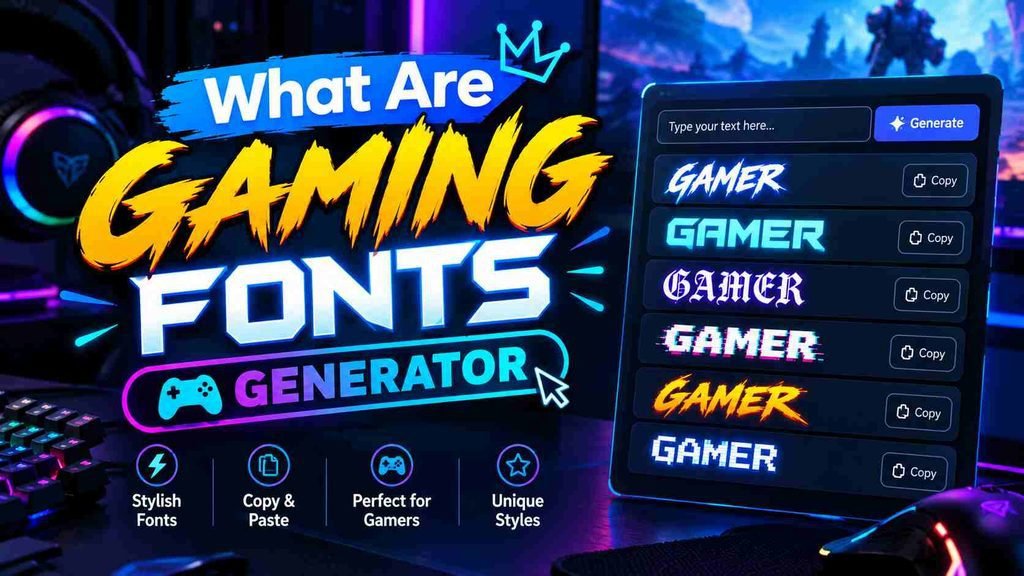
Gaming-style fonts are usually Unicode character sequences, not separate typefaces installed on a computer. A browser-based tool lets players type your name, compare a preview, and pick a style for supported gaming profiles or chats.
By contrast, design fonts in design software create polished logos, thumbnails, and overlays; Unicode styling is convenient for text fields, while installed typefaces give creators more control over layout, shape, and export quality for print.
Comparison Table: Gaming Fonts Vs Regular Fonts
Design gaming fonts rely on installed typefaces for artwork, while gaming Unicode text turns plain words into Unicode characters users can copy without software; these copy-paste gaming fonts may not behave like image-based designs everywhere.
For a tag meant for direct entry, prioritize standard text and normal input; use decorative Unicode only after testing, since username fields differ and some stylized output can’t be pasted into games on every platform.
How To Use The Generator
Start by choosing a gaming font generator that offers distinctive gaming fonts for your preferred game. Enter your username, explore the font list, and compare styles for readability before copying your favorite design.
Next, test your selected nickname across community platforms, Discord, and Twitch profiles. Check character support, preview small sizes, and use copy and paste to apply your chosen style wherever the platform accepts Unicode text.
Which Games Accept Gaming Fonts / Game Compatibility
Compatibility depends less on appearance than on each game’s filters: Free Fire and PUBG Mobile can display many styles, but Valorant applies Strict Riot filters, so most Unicode symbols still require testing on the server.
Roblox generally favors readable letters/numbers only usernames, whereas Minecraft compatibility depends on server settings and § formatting codes; Fortnite and COD Mobile may reject unusual glyphs, so test every character before using limited rename currency.
Also Read: Gothic Text Generator – Copy & Paste Gothic Fonts
Why Fonts Sometimes Break
Gaming fonts break because a game server applies filtering rules that reject certain Unicode ranges. A style may look correct on your device, yet appear as boxes or question marks after pasting into a match.
The italic option passes most filters on one platform but unsupported characters can still disappear; test a simpler style in the actual username field before saving your gaming name and checking it again after relaunching.
Compatibility Table
Before choosing a style, compare Fortnite, Valorant, Roblox, and Minecraft because each game applies different rules. Some accept limited Unicode letters, while others may be plain-text only or restrict symbols and numbers in player names.
Treat the table as a starting point, not a guarantee: Steam, Free Fire, PUBG Mobile, and BGMI may handle display names differently; check the length limit and whether community platforms permit your chosen characters today.
If Your Font Shows As Boxes
When a gamer tag appears as boxes, the problem is usually font support, not its appearance. Check whether the game accepts the characters, then test a simpler version on your device before saving it again.
Check compatibility before changing your nickname: lacking Unicode ranges can affect how characters render. Try a shorter variation, reopen the game, and compare the result with a plain version on another screen before playing again.
Gaming Fonts By Game
COD and Warzone names often suit Sniper, Operator, or Ghost themes, while PUBG players may prefer Chicken, Headshot, or Top Frag labels that remain clear in crowded kill feeds and compact profiles during competitive play.
For Mobile Legends, a Squad Tag or Clan Tag can signal teamwork; Ninja Style, Warrior, MVP, and Toxic Player variations add personality, but test each design in-game before choosing a permanent name for your account.
Gaming Font Styles And Categories
Choosing a gaming font style is less about decoration than recognition: Pixel, 8-bit, and retro designs suit nostalgic games, while Futuristic and Techno lettering gives competitive profiles a sharper identity without crowding the player name.
Category choices also signal personality: cartoon and 3D styles feel playful, horror and Old English add menace, while sports lettering or blocky bold caps can keep team names assertive and legible during quick gameplay scans.
Also Read: FB Font Generator – Stylish Facebook Fonts to Copy & Paste
Visual Features
Strong gaming visuals do more than decorate a nickname: Blocky shapes, bitmap edges, and arcade details signal a genre quickly, while balanced spacing keeps the result identifiable on crowded screens during fast matches and streams.
Use Fullwidth lettering or Monospace patterns sparingly; Clean and minimal designs often remain readable at small sizes, whereas Gothic and dark effects suit dramatic themes but can blur when compressed on compact game interfaces, too.
Mood
Playful lettering suits relaxed sessions, while Dark Style signals intensity; a gamer’s chosen look can set the team’s atmosphere before everyone starts the first match together online, and quietly shape first impressions across the squad.
During tense matches, Bold and aggressive forms may project confidence, but expressive styles can feel welcoming when a squad prefers humor; choose intensity that matches the identity you want teammates to remember after play ends.
Categories And Tags
Choose a Category by the identity your gamer tag should communicate; Anime, Cursive, and Minimalist options suit different communities, helping players signal a preferred aesthetic before teammates inspect profiles or invite them into matches together.
Pair Esports team names with Arcade usernames when audiences overlap; RPG names, dark-themed names, and Vintage styling deserve distinct tags, so players can filter ideas quickly without confusing genre identity across game communities and platforms.
Styles For Every Type Of Gamer
A competitive player may prefer Bold Italic or Crosshair styling, while a casual gamer might choose bubble letters or cute details; the right design should signal personality without weakening legibility during matches and team play.
For streamers, channel name readability matters more than decoration; Gothic Bold can create a dramatic identity, while Small Caps or Double Struck gives compact profiles a distinct look across games, bios, and clan tags alike.
Styles Offered
From Pixel and retro lettering to Bold Sans designs, a gaming font generator offers distinct looks for different identities. Choose compact styles for crowded interfaces and stronger shapes when visibility matters during fast matches online.
Try Bold Italic or Small caps for a sharper profile, then test Glitch and distorted effects or a strikethrough-style glitch where supported. Readability should lead; decoration works best when names remain recognizable at a glance.
Glitch And Strikethrough Styles
Glitch styles make a gamer tag look corrupted through shifted characters, while cursed text adds a darker mood visually. Keep distortion readable so teammates can recognize your name quickly during busy online matches and streams.
Use Strikethrough sparingly; layering it with small glitches can suggest a villain look, but too many marks obscure letters. Test the copied result in your game before choosing your final nickname for each gaming platform.
Gaming Fonts For Design: Logos, Thumbnails, Downloadable Fonts
For logos, real font files offer consistent control across design software, while a tool preview helps test a gaming identity. Compare letter spacing, silhouette, and contrast at avatar size before finalizing team artwork for launch.
For thumbnails, Impact and Rajdhani Bold create clear hierarchy; for DaFont downloads, check licensing and install the font file in your editor. Test titles over busy gameplay images so effects never overpower the message itself.
Popular And Trending Gaming Fonts
Trending styles are not always the loudest ones: neon header cuts can attract attention in thumbnails, while Minecraft-inspired lettering suits block-building communities. Choose styling that matches the game’s atmosphere and stays readable at small sizes.
The most copied format may suit a popular shooter, yet a smaller community can stand apart with simpler outlines, balanced spacing, and a name that remains clear on mobile screens during fast-paced matches and streams.
Designing A Readable Gamer Tag
A readable gamer tag should survive quick glances during matches, not merely look elaborate in a profile. Choose dense letters carefully, test the name at small sizes, and favor clarity over decoration before committing online.
Sans Bold can stay visible in busy gameplay, but unusual symbols may render differently across devices. Keep the core name short, pronounceable, and easy for teammates to recognize aloud during multiplayer matches without extra effort.
Clan Tags And Squad Naming
A strong Clan and team identity starts with a tag teammates can call out quickly; the Squad name should stay distinct in crowded lobbies, voice chat, and tournament overlays, not merely look elaborate everywhere online.
Pair an Alliance Tag with a readable Team Tag, then test both on the actual game screen. Short labels usually survive updates better than ornate designs and help squads recognize allies instantly during fast encounters.
Also Read: Instagram Fonts
Where To Use Gaming Fonts
Use gaming fonts beyond live matches: YouTube thumbnails need a strong title, channel art can carry a consistent team identity, and compact designs help viewers recognize your content while scrolling on phones at a glance.
For offline projects, adapt a readable style to T-shirts or birthday cards, checking mobile size previews before publishing; restraint usually works better than dense symbols, especially when the team name must remain recognizable at distance.
Font Customization Options
Start by testing pixel fonts, stylish alphabets, or a futuristic vibe against your gamer tag’s mood. Switch to a bold figure for visibility, then compare Square and Full Width treatments before deciding on a small mobile screen.
Keep a Clan Tag compact, add Brackets or a Bolt accent sparingly, then inspect the previewed result in-game. Save your favourite output only after checking readability on both desktop and mobile at realistic viewing sizes.
Popular Tags And Related Font Styles
Popular tag chips often pair game-inspired styles with Y2K, Medieval, or sci-fi lettering, helping players match a clan’s identity to its mood without sacrificing quick recognition across busy gaming profiles and streaming channels during matches.
Names inspired by Arcade Classic, ByteBounce, and Vampire Wars look distinct beside dingbats or indie logotype designs, but I recommend testing each option in actual lobbies before committing to elaborate decoration on every platform.
Game-Specific Style Name Groups
Players often tailor PUBG names for competitive visibility, while Among Us favors playful display names. For Mobile Legends, concise clan tags can make teammates easier to recognize in a crowded lobby and on the leaderboard.
Before settling on a style, check each game’s name-change feature and text input; some accept underscores or numbers, while others restrict special characters. A clean username often survives stricter filters than decorated alternatives in matches.
Decoration Categories
Decoration categories help players match a tag to their game identity: Vintage, wild west, army, and comic styles create distinct moods without changing gameplay or promising special in-game advantages. Choose for readability and available space.
Use Tattoo, digital, heart, border, or calligraphy details sparingly; animal, cultural tags, and movie themes can reinforce a squad’s concept, while frames keep names recognizable on compact screens and easier to scan during fast matches.
Conclusion
For effective gaming fonts, personality should never outrun readability. Choose unique nicknames and a distinctive tag that fit your genre, then preview them beside plain characters before using them across competitive titles and public profiles.
A polished name also needs reliable display: check fast loading, inspect the scoreboard, and confirm Unicode styled text survives each platform’s filters. The largest selection is useful only when your final choice stays legible everywhere.
What Is A Gaming Font Generator / How Does It Work?
A gaming font generator previews Unicode styled text and helps players create a distinctive tag without installing software. It changes displayed characters, not game code, so acceptance still depends on each title’s input rules alone.
Do Gaming Fonts Work In Fortnite?
Fortnite compatibility is determined by the Epic Games account and the particular naming field, not merely a design’s appearance. Ornate typography may work elsewhere yet still be rejected within Fortnite after an update, sometimes too.
Do Gaming Fonts Work In PUBG?
PUBG may display a style, but games can filter Unicode at the server level, causing broken characters. On PC, PUBG’s official nickname rules list letters, numbers, hyphens, and underscores; test compatibility before relying on ornamentation.
How Do I Use Gaming Fonts In Free Fire? / Do They Work?
To use gaming fonts in Free Fire, choose an FF names style, copy a style, then paste it into the nickname field. Most styles may display, but test first because unsupported characters can sometimes fail.
Do Gaming Fonts Work In Minecraft?
In Minecraft, Java usernames have stricter limits than ordinary labels, so decorative text may not transfer everywhere. Test server nicknames with a copied design first, then check its appearance in your edition before using it.



Pingback: Small Text Generator – Copy & Paste Tiny Text
Pingback: COD Name Generator – Cool Names to Copy & Paste
Pingback: B in Different Fonts – Copy & Paste Stylish B
Pingback: PUBG Font Generator – Cool Fonts to Copy & Paste