


COD Name Generator
Create cool, sweaty and stealthy Call of Duty usernames in one click.
💡 Quick tips for a great COD name
- Shorter names are easier to remember and read on the kill feed.
- Names are usually limited in length and characters, so check the rules for your platform and game.
- Tap a name to copy it, or tap the heart to save it for later.
- Avoid personal info and offensive words, since they can get a name changed or reported.
At its best, a CoD name generator is more than a random tool: it helps FPS fans shape gamertags that signal personality, suit squad roles, and remain readable during fast matches, without sacrificing originality online.
Players often chase intimidating labels, but gamertags can communicate humor, preferred roles, or familiarity with military culture. Test each option in live matches; readability and personal fit matter more than copying a rival’s name blindly.
Table of Contents
How To Use The CoD Name Generator
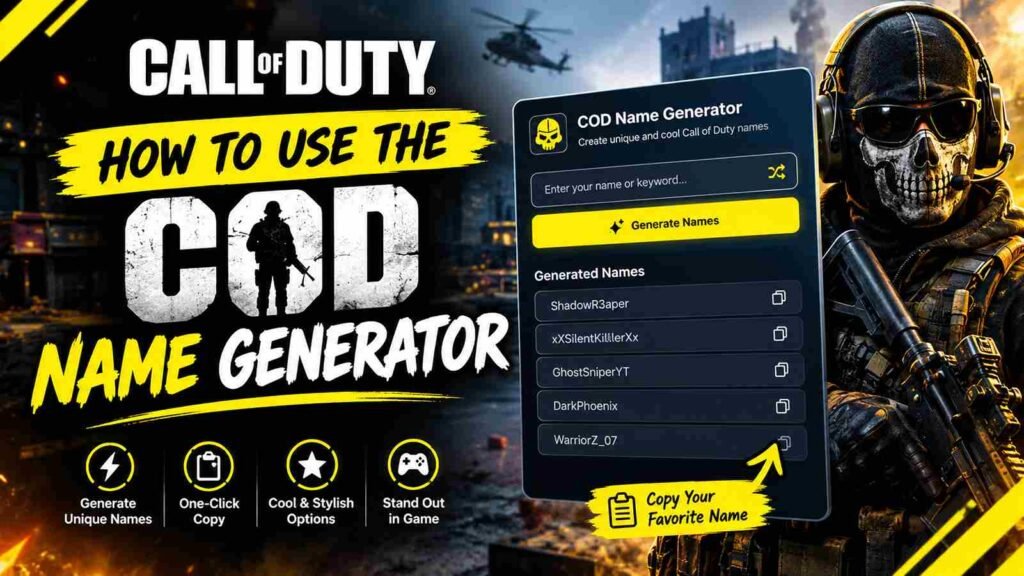
Enter a basic name, then compare tactical names, funny names, and edgy Unicode styles against your playstyle. A stylish name stays readable at a glance in multiplayer, killcam, and killfeed views during ranked play.
Try copy and paste variations, including symbols or leetspeak, but test variants on any platform before choosing one. Skip crowded decoration; a unique name works best when teammates can recognize it quickly during busy matches.
CoD Naming Conventions / Name Styles
Strong naming conventions prioritize instant readability over clutter. Start with a compact identity, then add military-style decorations only when they support the character you want teammates and opponents to recognize quickly during hectic online matches.
Squads can connect through coordinated team tags, yet matching every member too closely may erase individual distinction. Compare a few versions in actual play, checking clarity on small screens before keeping one across all profiles.
Finding The Perfect CoD Gamertag / Tips For Choosing A Name
A memorable tag rarely needs elaborate symbols; short syllables, hard consonants, and a clear action word often create instant recognition. I test GhostViper or ThunderStrike in voice chat with teammates before settling on an identity.
Choose a style that fits your playstyle: Tactical names suggest control, while Aggressive choices project pressure. For comic confidence, CampingChair or CtrlAltDefeat adds self-deprecating humor without confusing teammates or turning your gamertag ideas into clutter.
Also Read: Gaming Fonts Generator – Copy & Paste Gamer Fonts
Funny CoD Names
Comedic CoD names often turn wordplay into a laugh. LoadoutLarry suits a teammate who packs everything, while NoobMaster69 jokingly celebrates beginner mistakes without insulting teammates or making matches hostile during online sessions with the squad.
Another option, TacticalTurtle, pokes fun at cautious movement; pair that style with an unexpected animal, food, or rank reference. Choose something teammates can pronounce quickly, and keep the joke friendly during intense multiplayer rounds online.
Offensive / Badass CoD Names
An intimidating tag does not need profanity; bold wording, skull motifs, and harsh guttural sounds can signal confidence. Combine raw power with deadly precision to make opponents remember every encounter in high-pressure competitive matches online.
Try ScorchTitan, NapalmDrop, or SilentReaper when your style favors intimidation over comedy. Keep symbols restrained, test readability in lobbies, and choose a name that matches your actual gameplay while keeping it clear in fast firefights.
Warzone Names
A sweaty Warzone name should stay sharp under pressure; Ashvault and Nullpace feel distinct because they survive quick glances, voice callouts, and crowded menus without ornaments or confusing spellings during fast ranked matches in combat.
Treat the generator as a readability test: keep options short, prefer hard-consonant words, use no numbers, and iterate until each tag remains legible at killfeed size during hectic live matches with teammates nearby on comms.
Popular / Best CoD Names And Meanings
Popular Warzone names earn recognition when they suggest a role, not just aggression: DropZoneKing signals confident entry, while ContractRunner suits players who prioritize objectives, movement, and smart resource management before chasing eliminations across the map.
For memorable identity, VerdanskVet evokes map knowledge, GulagHero hints at a comeback mindset, and LastCircle puts the focus on composure; choose names teammates can read quickly during busy callouts and tense endgames in live matches.
Cool / Sweaty CoD Names
Cool names earn respect through control, not decoration: OneShot suits precise players, while StealthOwl signals patience. BulletStorm fits aggressive pushes, but clean spelling keeps the tag memorable and readable in fast callouts during intense matches.
The sweatiest look is often restrained: MVP labels and Legendary lobbies reward confident play; ranked-player decorations or pro badges add competitive polish when teammates can identify you instantly without cluttering the killfeed under real pressure.
Also Read: Glitch Text Generator – Copy & Paste Glitchy Text
Clan Tag Names
Clan Tag design works best when it communicates team identity instantly during crowded matches. Choose short options teammates can recognize in kill feeds, scoreboards, and voice chat, without confusion or awkward spelling under pressure.
A clan name generator can help squads test tags within 5 characters, then place the tag in front of your name. In Call of Duty, readable clan tags matter more than decoration during team matches.
Best COD Names For Boys
For boys who prefer a confident look, choices like Blade, Ghost, Hunter, and Thunder feel sharp without complicated decoration. Pick a style that stays memorable during matches, group chats, and intense rounds under pressure online.
For a sharper personal profile, test BlazeRunner or EchoStrike beside your display name before committing. A good choice reads cleanly in gameplay, feels personal, and remains easy for teammates to recognize across fast multiplayer matches.
Cute Names For Girls
Girls can choose a playful COD identity that feels confident without sounding harsh. Kira, JoyBomb, and JovialJester offer different moods: sleek, cheerful, and cheeky, while staying memorable in fast-moving lobbies with a clear personal touch.
Try HappyHeadshot for a gaming-inspired joke or Sweet Kills for a softer contrast; test each option in your profile and killfeed, then pick whichever teammates can read and remember easily during busy online matches too.
OG Names
OG names feel earned, not decorated: a memorable gamertag uses a strong concept, compact compound words, and a short punchy rhythm. In ranked matches, clarity helps teammates recognize your persona instantly without distracting the killfeed.
Skip copied trends and excess symbols; an OG identity stays unique, easy to pronounce, and readable on the scoreboard. Check your Activision ID and platform limits before choosing an original tag teammates remember across seasons.
Weapon Motif Names
Choose a weapon-inspired tag for its identity, not merely its threat. Weapon Motif ideas such as flashbang or LoadoutDrop suggest timing, equipment, and a tactical role before teammates even inspect your stats during a match.
For balance, pair weapon motifs with military concept wording, or use weapon symbols sparingly; explosive imagery can look memorable, but readable names help squadmates recognize you in the killfeed without slowing callouts during close fights.
Pro & Ranked Styles
In ranked lobbies, Pro and Ranked names work best when they stay compact, readable, and purposeful; a clear identity helps teammates recognize you quickly during high-pressure matches without distracting ornamentation, screen clutter, or exaggerated styling.
From my experience, a disciplined gamertag feels more credible than decoration: choose a concise player handle, ensure it stays killfeed-readable, and keep the same identity across squads and tournaments during intense online ranked team matches.
Also Read: PUBG Font Generator - Copy and Paste Stylish Names
Attitude & Edgy Names
Attitude and Edgy tags work best when aggressive names stay readable: rogue names, demon names, and shadow imagery can signal confidence without awkward symbols, helping teammates recognize your hard-edged identity during fast callouts under pressure.
Use SavageNoScope sparingly; trash talk and psychological pressure may project dominance, but a username becomes a lasting permanent identity. Favor short words and avoid personal insults that distract from actual skill in close ranked matches.
Call Of Duty Name Rules
Before choosing a Call of Duty identity, check the current 3 to 16 characters requirement and permitted letters and numbers; avoid profanity or names that break impersonation rules, since moderation can affect visibility in matches.
Keep the visible name portion distinctive and readable, because a numeric tag or hash may distinguish accounts automatically; always verify platform limits before saving, and test how your chosen name appears in lobbies during matches.
How To Change Name In COD Mobile
Changing your CODM identity starts in-game, not via account settings. Open your profile, select the edit icon beside your name, enter a new username, then tap Change to save when the prompt appears on screen.
If no rename card is available, the game prompts a purchase; check CP or Credits availability before paying. Limited changes mean waiting three days between updates, on Android or iOS, and confirm spelling carefully first
How To Change Name Without A Rename Card
In Call of Duty Mobile, changing your username normally requires a Rename Card; the game offers no reliable card-free shortcut. Open the main screen first and review available prompts before trusting any outside services online.
If your card is missing, use the rename flow and review the in-game store; Activision says players without one are prompted to purchase it. A card may sometimes be issued after a moderation-related name change.
Conclusion
Choosing a COD name is less about intimidation than a clear tactical identity. Test your options in real matches, keep callouts readable, and pick a style teammates can remember easily during intense matches under pressure.
The generator is useful when it helps you test playstyle against team utility, rather than chasing trends. Review the name in menus and match chat, then keep the option that remains readable and suits identity.
What Is A COD Name Generator?
A COD Name Generator uses an AI generator to suggest Unicode nicknames matching a battlefield persona; a Search and Destroy player might prefer intimidating names, while another player may seek humor, clarity, or an identity.
What Are Good Call Of Duty Gamertag Ideas?
Good COD gamertags balance readability with personality: choose a memorable, compact name that signals your playstyle, such as ClutchKing, Tiltproof, or PotatoAim42, while keeping it recognizable in matches, lobbies, and team chats without unnecessary symbols.
How Do I Choose A Memorable COD Gamertag?
Choose a tag with a memorable sound and identity; keep it within 8-12 characters, test it in party chat, avoid confusing spelling, and select something teammates can quickly pronounce, recognize, and link to your gameplay.
What Makes A Good Warzone Name?
A good Warzone name signals your style before the parachute drop: choose memorable hard-consonant words, reflect smart positioning, and stay readable in the final ring. Skip clutter; a clear identity suits battle royale pressure well.
What Are The Rules For A Call Of Duty Name?
Call of Duty names must follow profanity rules and impersonation rules. Keep tags within 3-16 characters, use allowed letters and numbers, and note this independent tool is not affiliated, sponsored, or endorsed by Activision itself.


Pingback: Free Fire Font Generator – Cool Gaming Fonts
Pingback: PUBG Font Generator – Cool Fonts to Copy & Paste
Pingback: World Cup Font Generator – Copy & Paste Text