

3D Text Generator
Create dimensional text, customize styles, and download high-quality PNG images.
01 · Your Text & Style
02 · Depth & Shape
03 · Colors & Background
04 · Export Options
Everything runs locally in your browser. This lightweight generator uses layered canvas rendering for realistic-looking text extrusion.
Strong 3D text generator results depend on more than a decorative font. By shaping typed text with depth, balanced light, and a controlled shadow, lettering can become a visual asset for branding, posts, or mockups.
Before exporting, inspect how letters meet at their edges, whether texture supports the message, and if the transparent PNG keeps its outline. Good dimensional design stays readable at thumbnail size and in larger layouts, too.
Table of Contents
What Is A 3D Text Generator Works
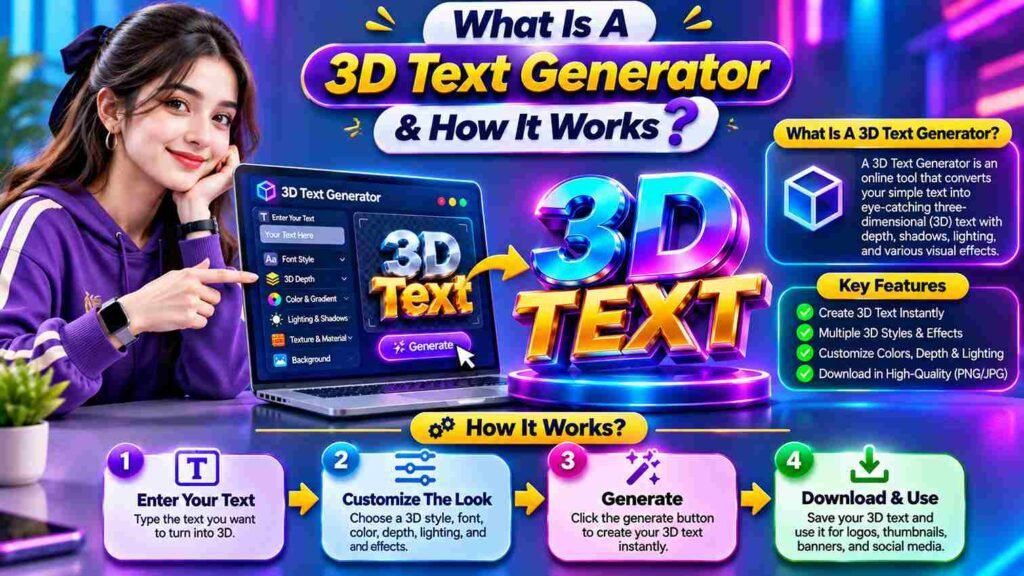
A 3D text generator turns ordinary wording into three-dimensional shapes by extruding flat letter shapes into visible depth. Instead of choosing a typeface alone, creators inspect real geometry, spacing, and side walls before exporting designs.
Most browser tools render a live preview, letting users rotate lettering, test depth, then export a PNG for graphics or an OBJ, GLB, or STL when a compatible workflow needs a model for further editing.
Features / Why Use This Generator
One standout advantage is experimentation: 20 built-in typefaces offer distinct personalities, while 3D presets help shape depth. Fine-tune lighting, glow, and contrast, then check the real-time preview before saving with quick visual feedback on screen.
From gaming titles and product mockup concepts to high-resolution PNG exports, the generator supports quick experimentation. Its built-in font choices and 3D style options help creators test logos fast before committing to print or branding.
Also Read: Tattoo Font Generator – Free Tattoo Lettering Style
How To Make 3D Text (Steps)
Start with type your text, then choose a font that suits the message; adjust letter spacing and selected size until the words stay readable at thumbnail scale while refining depth and contrast for balanced results.
Use the preview toolbar to check depth and lighting at angles; compare the live WebGL preview with your layout, then select the download button and confirm effects are baked into PNG export before sharing publicly.
Fonts Available
A useful editor may include 20 built-in typefaces or 15+ built-in fonts, giving titles distinct silhouettes before depth, lighting, and materials are adjusted. Check narrow letters and bold shapes at your intended output size first.
Check whether TTF or WOFF2 files support custom upload; when you can upload your own typeface, test spacing and letter shapes across sizes before exporting, because any font may render differently once effects are applied.
3D Text Styles, Templates & Effects
A useful starting point is presets: compare chrome, bubble letters, and glitter text as separate directions, then choose based on audience, readability, and where the finished lettering will appear on screens and in print settings.
For energetic branding, neon, sports logo text, and rose gold text offer contrasting moods; compare scale and contrast at final size, since a dramatic preview may lose clarity when reduced for actual use on mobile.
Export Formats
GLB, OBJ, and STL serve different project workflows, so choose the file type after deciding whether your project targets Blender, a game engine, or consumer 3D printers; check geometry and appearance before final production begins.
For interactive use, confirm support for Unity, Roblox Studio, or Unreal in your destination software; compatible labels alone do not guarantee a clean import, and no extra conversion should be assumed until you test files.
3D Printing
Start with simple shapes and solid lettering, then choose a scale that suits the object. Before printing, convert the design and inspect it in a slicer for fragile details that could snap easily after removal.
Compare single-color output in PrusaSlicer, Bambu Studio, or ELEGOO Cura after checking the preview; if a model fails inspection, use conversion tools only to repair actual geometry, not merely to make text look unnecessarily thicker.
Use Cases / Who Needs It
Small businesses use a 3D text generator to create logo concepts, product tags, and signage without commissioning every draft. Designers can test chrome-like text effects or raised lettering before choosing a production-ready direction more quickly.
Content creators, teachers, and hobbyists also benefit: social graphics, classroom decor, party printables, and YouTube thumbnail lettering can look dimensional, while cake toppers, keychains, and name plates help makers preview personalized items before 3D printing.
Commercial Use
Commercial projects can be viable, but check rights and the font license before selling designs. Google Fonts, bundled fonts, and uploaded fonts may carry different conditions; in Workspace, verify permissions for each asset before launch.
Commercial outputs may support videos, games, or 3D prints for sale, yet a plan should define ownership, restrictions, and attribution. Confirm whether AI-generated models permit resale and whether no attribution truly applies to your project.
3D Font Creator From Image References
Upload a reference image or photo of lettering to guide your 3D font generator workflow; a clear visual direction helps match letter proportions, depth, edges, and lighting without assuming the image automatically creates editable geometry.
Treat the picture as a prompt, not a blueprint: upload your own sample, compare the generated face and side walls, then refine the AI approach with simpler shapes when tiny details disappear at small sizes.
3D Letter Generator For Cleaner Maker Files
For cleaner maker output, build characters around clean vector paths before adding depth; ornamental effects may look polished on screen, but simple outlines are easier to edit, scale, and prepare for fabrication without node corrections.
Check stroke thickness and laser cutting requirements at production size. A vector cleanup pass can remove overlaps and fragile details, making every character reliable before sending the design to fabrication tools with fewer revisions later.
Good 3D Font Ideas & Examples
Try chrome lettering for gaming headlines, bubble letters for playful decals, or raised wood letters for handmade displays. Match each effect to its audience, canvas, and intended viewing distance before exporting finished creative design assets.
For premium branding, test glossy acrylic text, gold faces, or neon-sign text against a simple backdrop. Keep outline details restrained; contrast and letter shapes with readability usually outperform effects that crowd the message on screens.
Layered Acrylic Name Signs
Layered acrylic signs work best when separate sheets sit on a measured plane. For name signs, keep the lettering weight consistent, edges aligned, and mounting points unobtrusive so depth feels intentional rather than bulky overall.
For small shops, a restrained display can elevate personalized gifts without distracting from the name. Test the signage from viewing distance, preserve consistent margins, and ensure pieces remain easy to clean and are securely mounted.
Engraved Wooden Gift Tags
For engraving, a gift tag gains dimension when an embossed gift tag mockup preserves wood grain. Add a name, short message, or date; preview spacing before cutting or scoring for a clean, consistent finish overall.
For rustic packaging, combine material contrast with bold, readable forms; a 3D text generator can test bevel, color, and style before production. Keep fine details spacious so small tags remain legible after the engraving pass.
Sticker Sheet Lettering
Use Sticker lettering for short labels, playful names, and party covers; a restrained 3D edge adds depth while keeping each word readable after printing, trimming, or sharing digitally at small sizes on crowded sheets too.
Choose sticker-style type with broad faces and uncomplicated outlines; tiny bevels can disappear during cutting, so preview the artwork at its final size, leave breathing room, and test one sample before producing a full sheet.
Metallic Labels And Badges
Metallic labels should remain readable before reflections take over. I usually start with chrome badges, restrained depth, and controlled highlights, then test each design carefully against light and dark backgrounds at small display sizes too.
For rose gold text, balance warm metallic color with deliberate spacing and controlled highlights. A modest bevel adds depth without weakening fine lettering, especially when labels must remain clear on screens and printed materials consistently.
Popular Template Starters
Start with a craft sample that fits the project, then treat popular templates as practical starting points, not finished designs. A strong starter gives your logo idea structure while leaving room for choices and refinement.
Compare 18+ template styles before editing: a template-led layout may suit product labels, while a blank canvas can help unusual lettering. Use style words to guide effects, then check the preview toolbar before exporting designs.
Also Read: Font Generator ✨ Copy and Paste Fonts & Fancy TextNeed A Style Before You Need More Controls?
Start with a clear visual goal, not a crowded control panel. Choosing a template that matches your intended result helps you shape depth, lighting, and typography before adjusting details that may not matter at all.
For practical projects, explore highest-intent searches to spot familiar starting points, then personalize the wording, extrusion, and finish. A good template narrows early choices without limiting the final design you ultimately create for your audience.
About 3D Lettering
About 3D lettering begins with depth, not decoration: extruded lettering gives characters visible sides, while real 3D geometry lets designers rotate forms, inspect each underside, and judge how light shapes readable, dimensional words on screen.
In practical projects, choose fonts with clear counters, then adjust stroke weight, spacing, and material cues before export; a convincing rendered in 3D preview helps test whether lettering suits logos, signs, or packaging at scale.
9 3D Faces
A flat text generator can preview nine 3D faces as letters are rendered in three dimensions; inspect the heavy faces first, because broad front surfaces establish visual weight before finer edges attract attention at scale.
Use a gentle tilt to inspect the underside and note how the result looks from above; a thin stroke may vanish at small sizes, so compare the final shape before exporting at thumbnail scale first.
Make A 3D Logo From Text
A strong wordmark starts with readable lettering, not effects. Enter your name, choose a typeface, then extrude it with restrained depth and lighting so the brand remains recognizable at small sizes across profiles and packaging.
SVG artwork preserves crisp edges for many design workflows, while raster logos suit quick mockups. If your source is only an image, an image-to-3D generator may help, but inspect letter shapes before exporting for consistent final results.
3D Text Vs AI Text-To-3D
Conventional 3D lettering preserves exact letters because the tool extrudes fonts into a controlled form, creating readable titles and printed lettering. Designers guide the shape directly instead of asking a model to invent an object.
Meanwhile, AI text-to-3D interprets a description such as a dragon or chair; results may take 30–60 seconds per generation, and photoreal PBR textures can look convincing without preserving typography accurately for a logo or title.
Free Alternative To 3D Text In Photoshop
A browser tool can be a practical alternative to Photoshop for quick 3D text, letting creators test depth and appearance online before committing to a design workflow or installing dedicated software on their own devices.
Although browser generators may provide a PNG download, they may not recreate PSD effects or preserve editable 3D layers; check export options carefully before using artwork in a production project for client work or revisions.
Also Read: Mirror Text Generator – Reverse & Flip Text Online
Production-Grade AI Text-To-3D (Workspace)
Inside a managed Workspace, AI workflows should create AI-generated models that teams can inspect, revise, and document before release. Confirm font license terms, asset ownership, and project rights before using these results commercially at scale.
A pipeline keeps adjustable properties, real-time 3D preview, and reusable editor link available while teams test materials, validate the generated result, and prepare each export format before delivery to production teams across projects and platforms.
Conclusion
I find that a 3D text generator turns letters into a visual asset, but the best result depends on purpose. For branding or a campaign, inspect vector logos, readability, edge clarity, and depth before launch.
For physical projects, verify safe spacing, material thickness, and file compatibility; for digital graphics, test contrast against surrounding colors. Treat every preview as a checkpoint, not proof that the exported asset is already fully production-ready.
Is The 3D Text Generator Free?
Yes, this generator is free, with no signup, no paywall, and unlimited creations. Running locally on your device lets you explore options without added fees, account registration, software downloads, or hidden upfront payment requirements today.
What Is A 3D Text Generator / 3D Font Generator?
A 3D text generator turns lettering into a mesh and a three-dimensional mesh, using extruding and solids to create depth, tilt, and shading. Unlike a flat text generator, it supports lettering ideas and three-dimensional shapes.
Can I Customize The 3D Effect?
Yes, adjust the bevel, lighting controls, and gradients to shape the effect; use the Material panel for surface finishes, then check the live preview before saving so edges, color, and depth remain clear across devices.
How Do I Make Or Download 3D Text?
To create polished lettering, choose a preset, type your text, adjust the background and selected size, then tweak colors. Check the file type before using the download button; save results for printing or digital designs.
Which Fonts Can I Use? Can I Upload My Own?
Explore 15+ fonts, including bold display styles, retro pixel fonts, and expressive handwriting. For brand consistency, check whether custom font upload supports your TTF or WOFF2 file before previewing the final 3D lettering effect carefully.

